Write A/B tests as plain JavaScript and CSS.
ABTestly is code first. A variation is real JavaScript and real CSS that you author in a full editor, review with a static code check, and preview on your live site before a single visitor sees it. No generated selectors, no drag and drop, no hidden runtime tradeoffs.
No visual editor, on purpose
Visual editors are useful for a copy tweak. Serious client side experiments often need production aware JavaScript, controlled CSS, reliable cleanup, and measurement developers can inspect. ABTestly makes that the default rather than the exception. You author JavaScript and CSS directly, target real routes and audiences, and measure exposures explicitly.
Code first does not mean workflow light. You still move from scope to QA to interpretation, without hiding a single technical decision.
How a variation is built
Every experiment has an Original, the unchanged control, plus one or more variants. Each variant carries three things:
- A name and a short key. The key is what shows up in reports and is bound at runtime as
ABTESTLY_VARIANT_KEY. - A weight, the share of traffic in the split. Weights are stored internally as basis points, where 10000 equals 100 percent, and the editor shows them as percentages. Auto even keeps the weights balanced as you add or remove variants, or you can lock a custom split.
- The change itself, JavaScript, CSS, or a redirect URL. Redirect variants fire the exposure event and then send the browser to an alternate page, which suits split URL tests between two real pages.
Each variant has a JavaScript pane and a CSS pane. Most variants only need to wait for the target element to exist and then change it. If you have SPA support turned on, you pair the change with a cleanup so the DOM undoes itself on a route change.
The Monaco editor
Variant code is authored in Monaco, the code editor from VS Code, with syntax checking that runs on every change. Save is blocked when there is a syntax error, so a broken variant cannot go live. Cmd or Ctrl and S saves without leaving the editor, and either pane opens fullscreen.
Once an experiment has been running long enough for its results to matter, the variant code freezes to stop an accidental mid flight change from inflating your effect size. If you genuinely need to change a running variant you can pause, edit, and resume for a fresh epoch, or reset the data and start over. Both are confirmation gated.
Review every change, keep every version
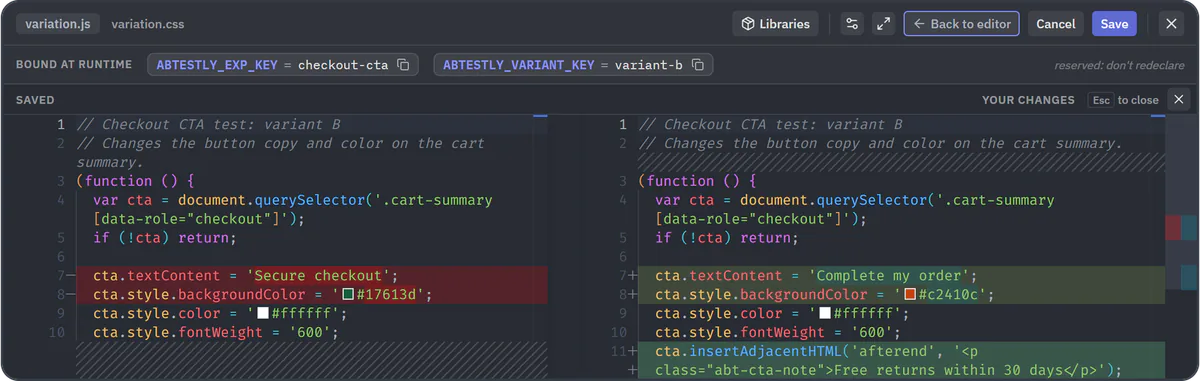
Saving a running experiment republishes it, so a stray edit reaches visitors as soon as you save. Before you save, Review changes swaps the editor for a diff of your unsaved edits against the saved code, in the same Monaco editor: side by side when there is room, inline when there is not. It works on the JavaScript and the CSS tab, you can keep editing and save from the diff itself, and a note above the diff names any library you added or removed, since a code diff cannot show those. The experiment form offers the same comparison as Compare with saved, and so does the banner that recovers an autosaved draft.
Every save that changes a variant's code is kept as a version. Open History on a variant to list its versions, newest first, each with who saved it, when, and the test's status at the time. Pick any two to compare them, or use a quick pick:
- Previous save. The latest version against the one before it.
- Since launch. The version that was current when the test launched, against the code now.
- Since last reset. The version that was current at the last data reset, against the code now.
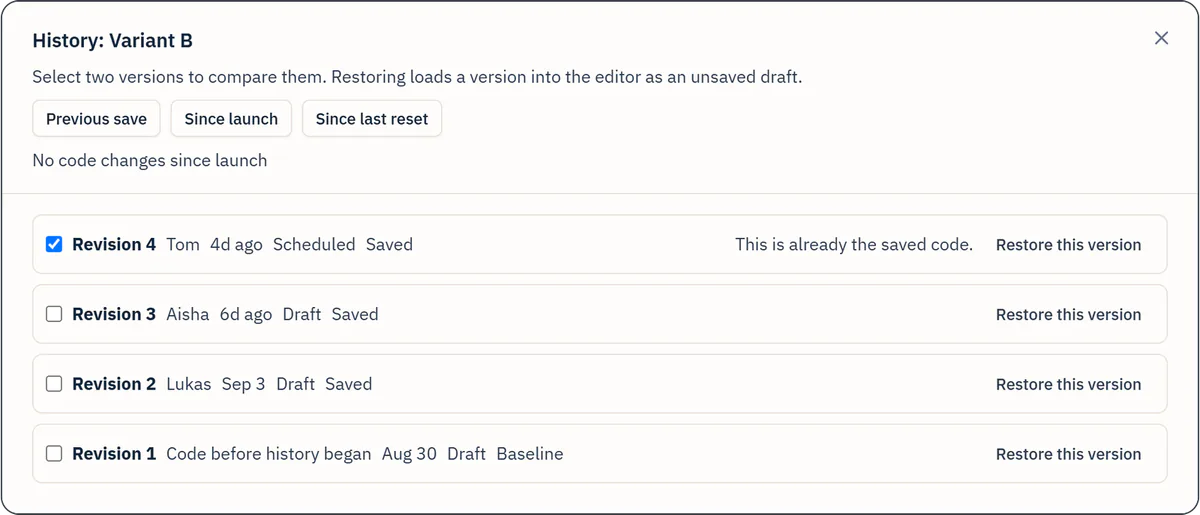
Restore this version loads an earlier version into the editor as an unsaved draft and opens Review changes. Nothing is written until you save, and that save goes through every check a normal save does.
Versions are stored in ABTestly for the life of the experiment, so there is no Git or GitHub connection to set up. Experiments that existed before code history start with a baseline version of each variant. Anyone who can view an experiment can open its history, and the Activity log shows variant code changes as a diff. Read the documentation.
A second set of eyes on every variation
Because you write real JavaScript and CSS, ABTestly reads it back. Every publish, save, and resume runs a static review of your variation code and flags the mistakes that quietly break experiments. It never blocks your publish.
- Warn only. Findings inform you. Shipping is always your call.
- Two tiers. Issues stay until the code no longer trips them. Suggestions are lower severity nits.
- When it runs. On publish, save, and resume, on ABTestly's side, not in your visitors' browsers.
- Coverage. Over 40 checks across variation JavaScript and CSS, grouped by variation.
The check catches common mistakes before they reach visitors, a querySelector() that can return null, an eval() that breaks under a strict Content Security Policy, or variation CSS that hides the whole page instead of using the platform anti flicker option. It is a set of heuristics, not a guarantee. If you are comparing tools, it is worth asking each of them what happens to the code you write in it after you hit save. See what it checks.
Global JS for shared code
Global JS is a single JavaScript block that runs once per page, before any variant, for shared helpers, polyfills, or one time analytics wiring. Instead of copying the same utility into every variant, you define it once and let variant code use it. It runs after the consent gate has passed and the visitor is not opted out, and it is wrapped in a try and catch so an error there does not stop variant JavaScript from running. The editor counts bytes and refuses to save over a 50 KiB cap. Global JS is available on the Pro plan and above.
Dev libraries, attached once
When two variants both need a carousel library you do not want two copies on the page. Attach a curated library, such as Splide or GLightbox, to a variant from a picker, and the runtime injects the script and CSS exactly once per page, on the pages a variant actually applies to. Each catalog entry is pinned to a specific version with an SRI hash, and you can attach up to three libraries per variant. Dev libraries are available on the Pro plan and above.
Preview and QA before launch
Any variant can be previewed on your live site without launching the test. A preview link opens your real site with one specific variant rendered, exactly as a matching visitor would see it, without starting the test and without recording any data. It works on draft experiments before you have ever launched and on running ones, and the link is shareable, so a teammate can open it and see the same thing. When something looks off on a real page, open devtools and call window.__abtestly.debug() to see whether this visitor was in the test, whether the change ran, and whether the result was tracked.
Runs on any front end
ABTestly loads as one lightweight snippet, about 31 KB gzipped with a loader under 1.5 KB, so it runs wherever your site already runs, React, Vue, Angular, Svelte, Next.js, plain HTML, Shopify, and single page apps. It loads asynchronously and does not block rendering. For the full pipeline that turns that snippet into an applied variation and an audited result, read the browser A/B testing runtime.
Quick answers
Does ABTestly have a visual editor?
No, by design. You author variations as JavaScript and CSS in the Monaco editor, so you get production aware code, controlled CSS, reliable cleanup, and measurement you can inspect. A visual editor hides tradeoffs that serious client side experiments cannot afford.
What can a single variant contain?
JavaScript, CSS, or a redirect URL. JavaScript and CSS panes live side by side per variant, and redirect variants fire the exposure event before sending the browser to an alternate page for split URL tests.
Can I reuse code across variants?
Yes. Global JS runs one shared block before any variant for helpers and polyfills, and dev libraries let you attach a curated library like Splide or GLightbox once per page. Both are on the Pro plan and above.
Can I check a variant before launching?
Yes. A preview link renders one variant on your live site without starting the test or recording data, and the variation code check runs a static review on every publish, save, and resume without ever blocking your publish.
Can I see what changed in a variant's code, and undo it?
Yes. Review changes shows your unsaved edits as a diff against the saved code before you save. History keeps every saved version of each variant's code for the life of the experiment. You can compare any two versions, jump straight to what changed since launch or since the last reset, and restore an earlier version into the editor as an unsaved draft.
Capabilities on this page reflect current ABTestly documentation. Global JS and dev libraries are on the Pro plan and above. See the pricing page for current plans and limits.